EN
DE
NL
FlowOS: The Raw Framework Documentation
(Standalone, Human-Centric, EU-Aligned)
1. Core Philosophy
A. Why FlowOS Exists
- Problem:
- Traditional frameworks (Scrum, OKRs, SAFe) are overly rigid, bureaucratic, and tool-dependent.
- US-based tools (Miro, Jira, Zapier) create data sovereignty risks and vendor lock-in.
- Solution:
- A lightweight, for real transformation—no agents, no bloat.
- Designed for (not just sprints) with minimal viable bureaucracy.
- Based on three agile frameworks:
- Design Thinking
- OKR
- Kanban (slightly modified)
B. Key Principles
- “Goed is goed genoeg” (good is good enoughh):
- Ship at 80%, iterate based on real feedback (like China/Silicon Valley, but with European pragmatism).
- Tool-Agnostic:
- Works with any tools (or none). Example: + whiteboard + spreadsheet.
- :
- Prioritizes data sovereignty and local control ().
- Anti-Perfectionism:
- Done > Perfect. Focus on outcomes, not process.
C. What FlowOS Is NOT
- ❌ Not a Scrum replacement (it’s simpler).
- ❌ Not agentic (that comes later with Relevance).
- ❌ Not one-size-fits-all (adapt to your context).
2. The FlowOS Framework
A. Time Horizons
| Layer | Timeframe | Purpose | Example |
|---|---|---|---|
| Vision | 12–18 months | Strategic north star. | “Digitize all member services.” |
| MGMT Objectives | Quarterly | Validated goals (with 5 Whys). | “Reduce onboarding drop-off.” |
| Team Objectives | Quarterly | Team-owned, high-impact goals. | “Add feedback loop to form.” |
| Key Results | 4–6 weeks | Actionable, testable tasks. | “Prototype button + test.” |
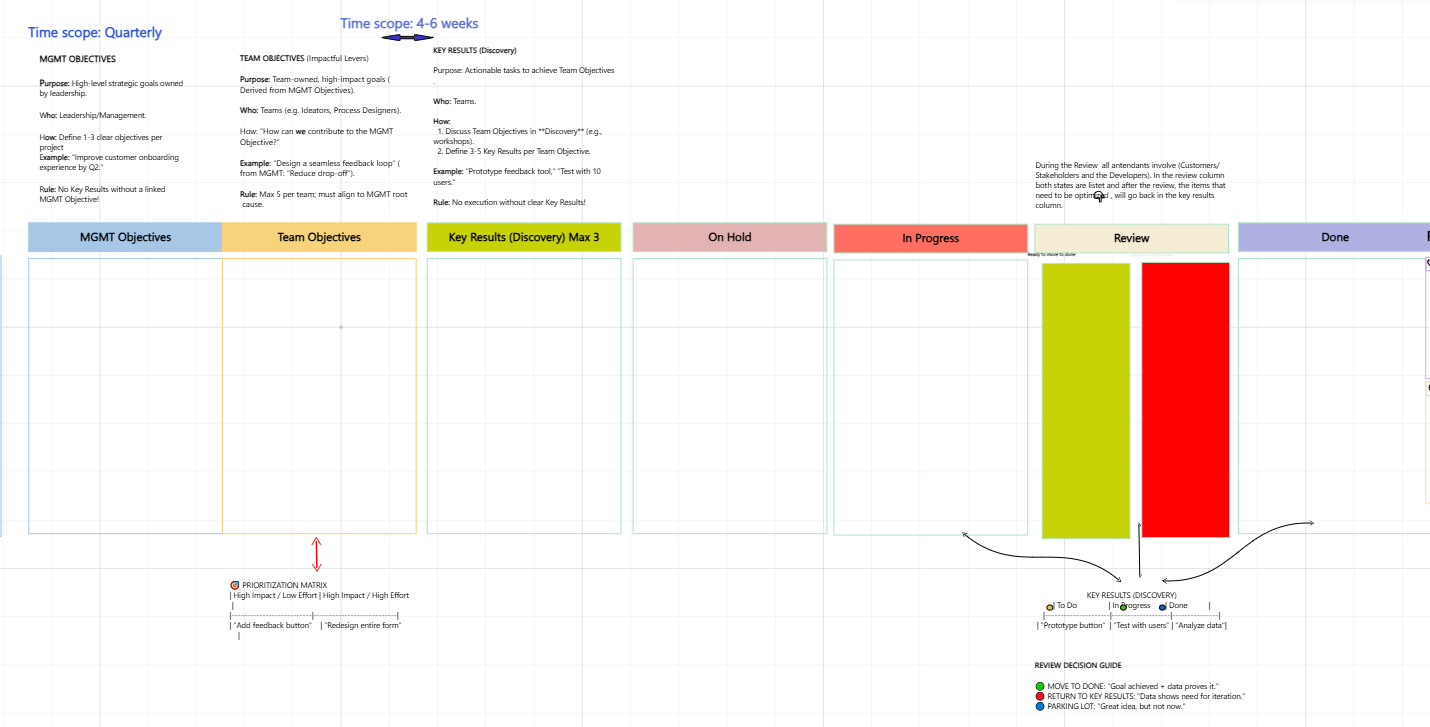
Right click and open in a new browser tab, to be able to see the full size image.
B. The Board (Tool-Agnostic)
[MGMT Objectives] → [Team Objectives] → [Key Results] → [On Hold] → [In Progress] → [Review] → [Done]- Physical or Digital:
- Use a whiteboard, spreadsheet, or any kanban tool (e.g., WeKan, Taiga).
- Colors (Optional):
- Blue: MGMT Objectives (strategic).
- Yellow: Team Objectives (collaborative).
- Green: Key Results (actionable).

The five whys flow https://blog.mindmanager.com/the-five-whys-method/
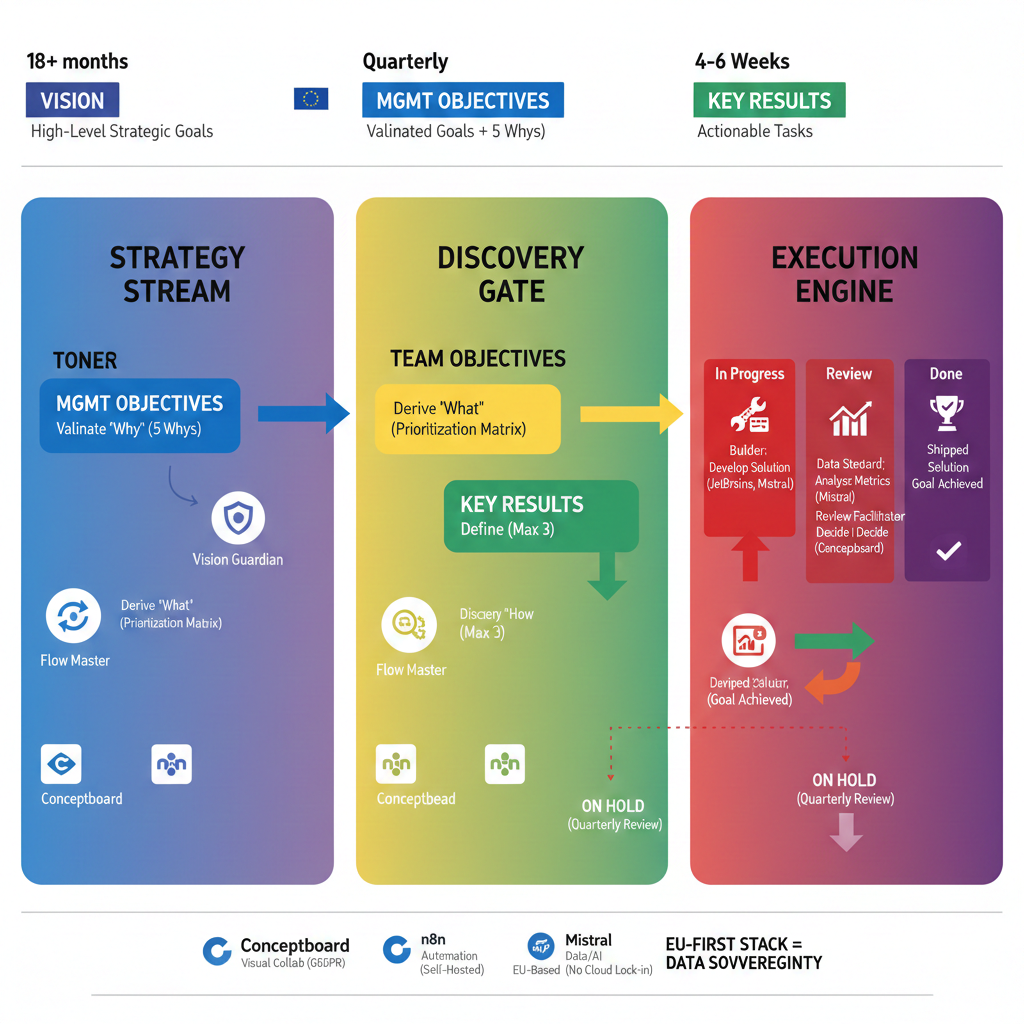
C. Workflow Zones
- Strategy Stream:
- Input: Leadership goals.
- Output: Validated MGMT Objectives (with root causes via 5 Whys).
- Method: Whiteboard or doc (e.g., Filen).
- Discovery Gate:
- Input: MGMT Objectives.
- Output: Prioritized Team Objectives + Key Results.
- Method: (see below).
- Execution Engine:
- Input: Key Results.
- Output: Shippable solutions + data-driven decisions.
- Method: Kanban flow (physical or digital).
3. Roles (Not Titles!)
| Role | Responsibility | Example Tools | Key Question |
|---|---|---|---|
| Vision Guardian | Validates MGMT Objectives + 5 Whys. | Whiteboard, Filen docs | “Why does this matter?” |
| Flow Master | Facilitates Team Objectives. | Workshop notes (Filen) | “How can we achieve this?” |
| Discovery Lead | Drives tests/feedback for Key Results. | Prototypes, surveys | “What’s the simplest test?” |
| Builder | Creates solutions. | Local dev tools, Filen | “What’s the MVP?” |
| Data Steward | Tracks metrics. | Spreadsheets (LibreOffice) | “Did we hit the goal?” |
| Review Facilitator | Leads review decisions. | Meeting notes (Filen) | “Iterate or move to Done?” |
Rule:
- Rotate roles weekly/quarterly to avoid silos
4. Tools (Minimalist & EU-Aligned)
| Need | EU-Friendly Options | Purpose |
|---|---|---|
| Storage | Filen, Nextcloud | Docs, prototypes, meeting notes. |
| Collaboration | CryptPad, physical whiteboard | 5 Whys, workshops. |
| Task Tracking | WeKan, Taiga, or spreadsheet | Kanban board. |
| Development | VS Code, JetBrains (local) | Build prototypes. |
| Data Analysis | LibreOffice Calc, SQL (local) | Track metrics. |
5. Step-by-Step FlowOS Process
A. Define MGMT Objectives
- Start with a strategic goal (e.g., “Improve onboarding”).
- Validate with 5 Whys (no tool needed—just ask “Why?” 5 times).
- Example:
Goal: "Reduce drop-off."

Why? → "No feedback loop."

Why? → "Users don’t know how to give feedback."

Why? → "Button is hidden."

Root Cause: "Poor UX design."
- Example:
- Stakeholder check: “Does this align with our vision?”
B. Set Team Objectives
- Break MGMT Objectives into team-owned goals.
- Use the Impact/Effort Matrix:
| High Impact / Low Effort | High Impact / High Effort |

|-------------------------|---------------------------|

| ✅ "Add feedback button" | ❌ "Redesign entire form" | - Rule: Max 3 Team Objectives per quarter.
C. Execute Key Results
- Limit to 3 Key Results per Team Objective.
- Test early:
- Prototype → Test with 5 users → Gather feedback (store in Filen).
- No perfection: Ship at 80%, refine later.
D. Review & Adapt
- Data Steward checks metrics (e.g., drop-off rate).
- Review Facilitator decides:
- ✅ Done: Goal achieved.
- 🔴 Iterate: Needs more work.
- 🔵 On Hold: Future idea.
6. Prioritization Matrix (Visual)
| High Impact / Low Effort       | High Impact / High Effort      |

|--------------------------------|--------------------------------|

| DO NOW                         | SCHEDULE LATER                |

| "Add feedback button"          | "Redesign entire system"      |
7. Case Study: FlowOS in Action (No Tools)
Problem:
- A nonprofit wants to reduce onboarding drop-off but has no budget for tools.
Solution:
- MGMT Objective:
- “Reduce drop-off by 15%” (validated with 5 Whys on a whiteboard).
- Team Objective:
- “Add a feedback button” (prioritized with paper Impact/Effort Matrix).
- Key Results:
- Prototype button (drawn on paper).
- Test with 5 users (feedback written in a Filen doc).
- Data tracked in a spreadsheet.
- Result:
- Drop-off reduced by 10% in 6 weeks.
- Cost: $0 (no tools required).
Lesson:
- FlowOS works with pen, paper, and Filen.
8. Common Pitfalls & Fixes
| Pitfall | Solution |
|---|---|
| Overcomplicating the board. | Start with sticky notes on a wall. |
| Too many Key Results. | Enforce max 3 rule. |
| Stakeholders ignore input. | Share async updates in Filen. |
| “On Hold” becomes clutter. | Quarterly cleanup (archive old ideas). |
That sounds great! Focusing on the FlowOS Workshop is a high-value step, as it demonstrates the framework in action and helps practitioners immediately understand how to implement the Discovery Gate and the rotating roles.
Here is an expanded draft for the section, “How to Run a FlowOS Workshop: The Discovery Gate in Practice.” This content is suitable for a handbook or a detailed slide deck segment.
How to Run a FlowOS Workshop: The Discovery Gate in Practice
The FlowOS Workshop is the operational heartbeat of the framework, primarily focused on the Discovery Gate. This is where MGMT Objectives (Blue) are translated into actionable Team Objectives (Yellow) and prioritized Key Results (Green). The core philosophy here is rapid alignment and focus.
1. Preparation (Flow Master & Vision Guardian)
| Step | Duration | Responsibility | Key Tool/Action |
| A. Pre-Work Validation | 1 Hour | Vision Guardian | Ensure the MGMT Objective (Blue) has been fully validated with the 5 Whys and root causes are documented in Conceptboard. |
| B. Setup the Board | 30 Mins | Flow Master | Prepare the Collaboard template with the columns: MGMT Objective, Team Objective, Prioritization Matrix, and Key Results (with To Do/In Progress/Done sub-columns). |
| C. Invite & Context | N/A | Flow Master | Invite the core team and clearly state the single objective: “Derive and prioritize the top 3 Key Results for this quarter’s MGMT Objective.” |
2. Phase I: Derivation (Translating Strategy)
The goal of this phase is to turn the single, high-level MGMT Objective into multiple potential Team Objectives.
A. Review the Objective (10 Mins)
-
The Vision Guardian clearly presents the MGMT Objective and the confirmed root cause derived from the 5 Whys.
-
Crucial Rule: Teams must understand why the objective matters before proceeding.
B. Brainstorm Team Objectives (20 Mins)
-
Teams use Conceptboard to silently brainstorm potential team objectives that directly address the root cause.
-
Example: MGMT Objective is “Reduce drop-off.” Potential Team Objectives could be: “Improve loading speed on mobile,” or “Design a 3-click feedback loop.”
C. Prioritization Matrix (30 Mins)
-
The Flow Master guides the team to place each proposed Team Objective onto the Prioritization Matrix (Impact vs. Effort).
-
Decision Point: The team collectively agrees on one or two high-impact Team Objectives to focus on. These items are moved to the Team Objectives (Yellow) column.
3. Phase II: Discovery & Action (Defining Key Results)
This phase moves from what (Objective) to how (Action).
A. Key Results Brainstorm (20 Mins)
-
For the selected Team Objective(s), the team brainstorms highly specific, rapid actions (Key Results) designed for short-cycle testing (4-6 weeks).
-
The focus is on delivering $\mathbf{80\%}$ prototypes, not $100\%$ solutions.
-
Example: For “Design a 3-click feedback loop,” Key Results are: “Prototype the button,” “Automate the 10-user survey,” “Build the Mistral analysis script.”
B. The Max 3 Enforcement (15 Mins)
-
The Flow Master rigorously enforces the max 3 Key Results rule.
-
Teams must ruthlessly cut less critical items. If there are more than 3, the overflow moves directly to the On Hold (Light Red) column for future review.
-
The Power of Focus: This step ensures the team commits to only the most impactful tests and prototypes.
4. Phase III: Accountability & Close (Discovery Lead & Builder)
A. Role Assignment (10 Mins)
-
For the 3 selected Key Results, the team assigns the immediate Discovery Lead (responsible for validation planning) and the Builder (responsible for execution).
-
Remember: Roles rotate! Different people should take these on each cycle.
B. Tool Alignment (5 Mins)
-
The Discovery Lead confirms which EU-First tool is required for each result (e.g., n8n for automation, JetBrains for code, Mistral for data).
C. Workshop Conclusion
-
The Flow Master reviews the Team Objectives (Yellow) column and the final Key Results (Green) column, confirming all action items are clear, assigned, and ready to enter the Execution Engine.

